Bose app does not detect product | Bose Lifestyle Ultra Speaker
bose-lifestyle-ultra-speaker
Bose Lifestyle Ultra SpeakerSold from 2026

Bose app does not detect product | Bose Lifestyle Ultra Speaker

Check that your mobile device and Bose product are both connected to the same wireless network.

On the device running the Bose app, go to the Wi-Fi settings and be sure the device is connected to the same network as your product. If the device and product are not on the same network, the app won't find your product.

In your mobile device settings, be sure location and network permissions are turned on for the app.

Location permissions are used by the Bose app to detect and control your product. If location settings are disabled for the app, it will not work properly.
  • For iOS devices:
    1. Go to Settings > Privacy > Local Network and be sure it is not disabled for the Bose app.
    2. Go to Settings > Privacy > Location Services and be sure it is not disabled for the Bose app.
  • For Android devices, touch and hold the app icon, then tap App Info from the pop-up that appears. On the App Info screen, tap Permissions and be sure Your location is enabled.

Reset your product.

To reset your product, power it off and disconnect the power cord for 30 seconds.

Close and re-open the Bose app.

On an iOS device:
  1. Swipe up from the bottom center of the screen to view active apps.
  2. Swipe left or right to find the Bose app.
  3. Swipe up on the app to close it.
On an Android device:
  1. Locate the Bose app then press and hold on the app icon.
  2. Select App Info (or the circled "i" icon) from the pop-up that appears.
  3. On the App Info screen, select Force Stop.

After the Bose app has been closed, tap on the app icon to re-open it.

Reboot the device running the Bose app.

Electronics might need to be rebooted from time to time to correct minor issues. This is typically done by powering off the device completely and then powering it back on again.

Factory reset your speaker

If other troubleshooting has not resolved your issue, you can erase all settings and return your product to its default out-of-box state. Once reset, open the Bose app to reconfigure your product.
  1. Remove the product from your Bose account. For more info, see Removing a product from your Bose account
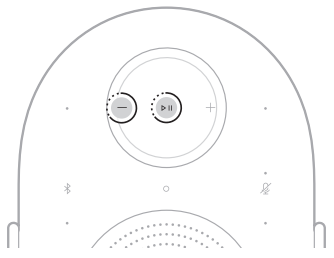
  2. Touch and hold the Play/Pause button and the Volume down button for 10 seconds until the status light on the front of the speaker slowly pulses amber
    image
  3. The restore is complete. The speaker reboots and is ready to connect.
  4. Delete the previous Bluetooth Low Energy (LE) pairing from your mobile device’s list of paired Bluetooth devices.

  5. Set up your speaker using the Bose app