Was this helpful?
Charging your headphones | Bose QuietComfort® Earbuds (2020)
Charging the Earbuds and Case
Charging the Earbuds
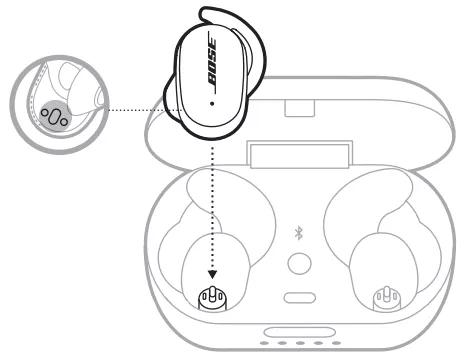
- Align the charging contacts on the left earbud with the charging pins on the left side of the charging case.
NOTE: Before charging, make sure the earbuds are at room temperature, between 46° F (8° C) and 102° F (39° C). - Place the earbud in the charging case until it magnetically snaps into place. The earbud status light shows the battery status:
- Slowly pulsing white - Charging
- Solid white - Fully charged
- Slowly pulsing red - Needs to charge
- Blinks red and white - Error, contact Bose customer service
- Repeat steps 1 and 2 for the right earbud.
- Close the charging case for the earbuds to charge. The case can remain open only if the case is charging.
- The Earbuds charging time takes 2 hours
- When the earbud battery level is low, a 15-minute charge with the case closed powers the earbuds for up to 2 hours
- A full charge powers the earbuds for up to 6 hours
- When the case is fully charged, you can charge the earbuds up to 2 times
- When the earbuds are inside of the case, the case charging time varies
Charging the Case
CAUTION: Use this product only with an agency approved power supply which meets local regulatory requirements (e.g., UL, CSA, VDE, CCC).- Close the charging case
- Connect the small end of the USB cable to the USB-C port.
- Connect the other end to a USB-A wall charger (not provided). The charging case status lights glow accordingly:
State
Indicates
1 power LED lit
0-20% battery charge
2 power LEDs lit
20-40% battery charge
3 power LEDs lit
40%-60% battery charge
4 power LEDs lit
60-80% battery charge
5 power LEDs lit
80-100% battery charge