Was this helpful?
Noise cancellation is not working | Bose QuietComfort Earbuds II
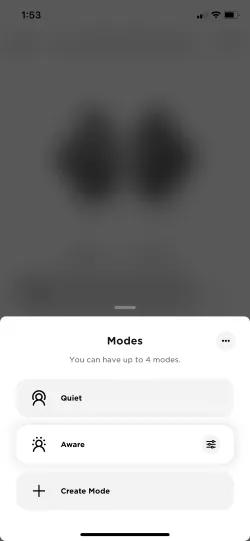
Make sure you are in "Quiet" mode.
See Setting the adjustable Active Noise Cancellation mode.
Switch to Quiet mode or disable ActiveSense
- iOS: 5.0.2
- Android 5.0.1
- QC Earbuds firmware version 2.0.7
In Aware Mode, ActiveSenseâ„¢ technology automatically adjusts the noise cancellation so you can enjoy your music comfortably. If the noise cancelling suddenly turns off due to loud noises around you, switch to "Quiet" mode or disable ActiveSense. See Setting ANC Modes for more information.
Resync the earbud connection
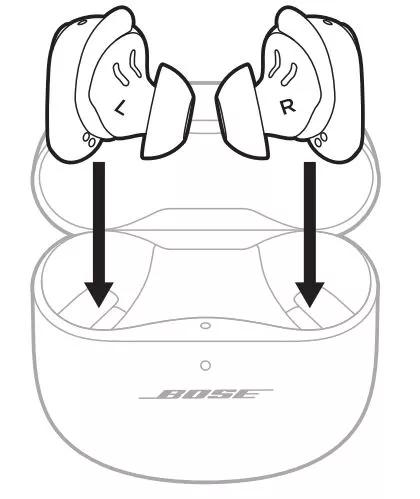
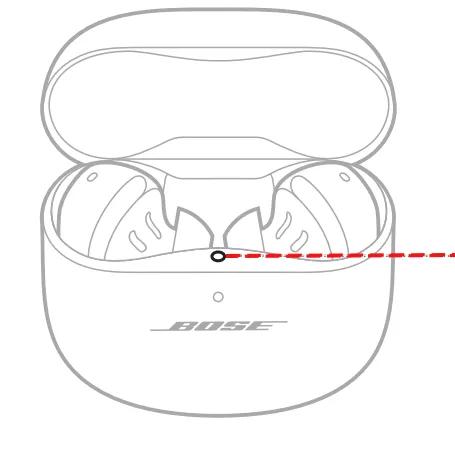
- Place both earbuds into the charging case. Keep the lid open. The earbud status light will illuminate when the earbuds are inserted into case. If the status light does not light up, press downward on the buds to ensure they are making a solid connection with the charging pins.
- Close the lid on the case.
- When the status light on the front of the case stops flashing, open the lid, remove just the right earbud, and place it into your right ear.
You should hear the welcome tone. - Place the left earbud in your ear. You should hear the welcome tone and can continue using your product.
Remove the earbuds from your ears and then reinsert them
Be sure you're wearing the earbuds correctly.
Make sure in-ear detection is enabled in the Bose app
Reset your product.
Much like rebooting a smartphone, your product might need to be reset on occasion to correct minor issues. For more information, see Resetting your product.
Your earbuds need to be replaced.
If the steps above did not resolve your issue, your earbuds need to be replaced. Click START A REPAIR OR REPLACEMENT below to begin the process online — the fastest and easiest way to get service.
