Was this helpful?


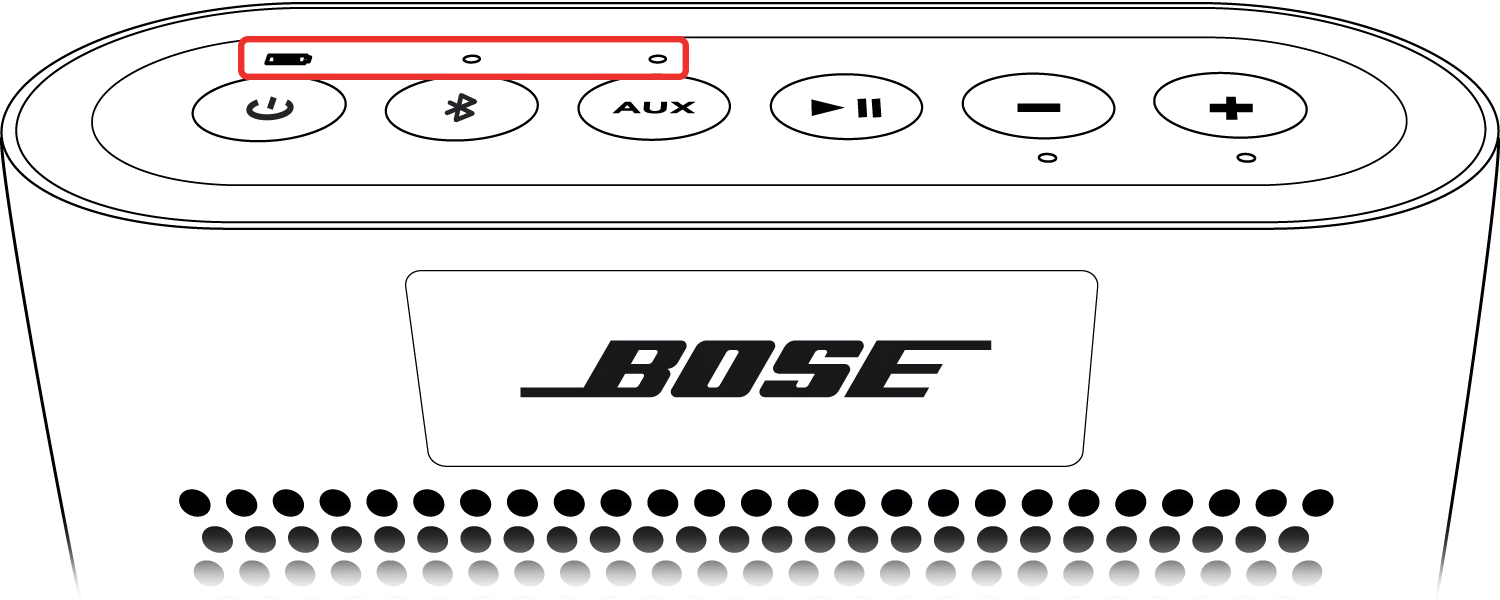
 Power LED (while charging)
Status: Amber, flashing
Information: Battery is charging.
The LED will flash amber until the battery reaches 100% charge. At 100%, the LED turns solid green and the system stops charging to prevent overcharging. When disconnected from AC power, the LED turns off.

Status: Green
Information: Charge complete.
Once the battery charge is 100%, the LED turns solid green and the system stops charging to prevent overcharging. When disconnected from AC power, the LED turns off.

Status: Red, flashing fast
Information: Battery error
 Power LED (when checking battery level)
Status: Green
Information: 50-100% battery charge

Status: Amber
Information: 10-50% battery charge

Status: Red
Information: 1-10% battery charge. Battery should be charged
 Bluetooth® LED
Status: Off
Information: Bluetooth source is not selected

Status: Blue
Information: System is in out-of-box language selection mode

Status: Blue, flashing
Information: System is discoverable to Bluetooth devices

Status: White, flashing fast
Information: Bluetooth source is connecting

Status: White
Information: Bluetooth source is connected
 AUX Input LED
Status: Off
Information: Auxiliary input not selected
Status: White
Information: Auxiliary input selected

