Was this helpful?
Programming your remote | Bose Solo 5 TV sound system
There is a Youtube video for these instructions.
If you don't have the code booklet that came with your remote, check which remote version you have.
- Remove the battery door from the back of the remote
- Remove the batteries from the remote
- In the battery compartment, find the part number, which begins with 714543- and is followed by four numbers.
- If the last two numbers are 20 (i.e. 714543-1020), use the code booklet with 4-digit codes
- If the last two numbers are 30 (i.e. 714543-1030) use the code booklet with 5-digit codes
To program your remote:
Here are some things to know:
- Some brands have many devices, so you might need to try several codes to find one that works
- If the source button on your remote turns off, it is not in programming mode. Start the programming process again
- While your univeral remote can control many devices, it might not be able to control or fully control all devices
To program the universal remote:
- In the remote control code booklet included with your system, find the code for the brand you want to control
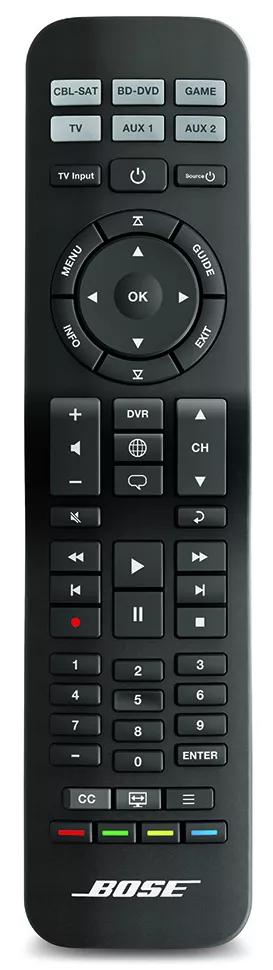
Tip: If you need the code booklet, search for and select your product at support.bose.com, then click the Downloads tab - On your remote, press and hold the source button of the device you want to control (i.e. TV or CBL-SAT) until all six source buttons glow
- Release the button so only the button you held glows
- Enter the code for the device brand, then press the Volume + button
Tip: If all six source buttons blink three times, an invalid code was entered - Check if the remote controls the device:
- For TVs, try the Channel buttons, then press Menu and try browsing with the Arrow buttons
- For cable/satellite boxes, press the Guide button and try browsing with the Arrow buttons
- For DVD/Bu-ray players, press the Menu or Guide button and try browsing with the Arrow buttons
- For game systems, try browsing with the Arrow buttons
- If the code works, press Exit to save your settings
- If the code does not work, press Volume + to select the next code for the brand, then repeat step 5
Tip: If the six source buttons on your remote blink three times, there are no additional codes for the brand.