No audio | Bose Sport Open Earbuds (2021)
bose-sport-open-earbuds-(2021)
Bose Sport Open Earbuds (2021)Sold from 2021 - 2023

No audio | Bose Sport Open Earbuds (2021)

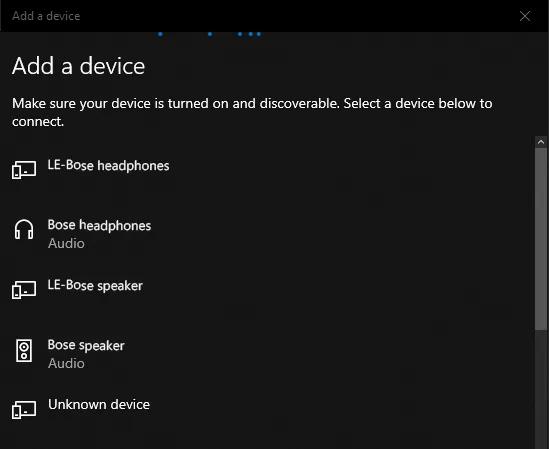
If adding a device to Windows, be sure to connect to the Bluetooth® device with the headset or speaker icon.

In Windows, your product shows up twice in the Bluetooth device list: once with a device icon and LE before the product name andonce with a headphones or speaker icon. Select the option with the headphones or speaker icon. Do not select the LE listing.

Tip: If you already paired to the device icon, just connect your product again and choose the listing with the headphones or speaker icon. For more info, see Connecting a Bluetooth® device.

Windows 10 Add a device screen

Reset your product.

Much like rebooting a smartphone, your product might need to be reset on occasion to correct minor issues. For more information, see Resetting your product.

Update your system software.

Product updates keep your system working at its best. For more info, see Updating the software or firmware of your product.

Try a different app.

If the issue only occurs with a particular app, it is likely related to the app or app settings.

Determine if the issue occurs with another Bluetooth® device.

The source device currently paired to your product may be causing the issue. Try pairing a different Bluetooth source to see if the issue is isolated to that device.

Remove your product from the memory of the Bluetooth® device, then try again.

In the Bluetooth settings of the Bluetooth device, find the list of previously connected products. Remove your product from the list, then reconnect it to the device. For more info, see Connecting a Bluetooth® device.