Setting up your product | Bose TV Speaker (2nd Gen)
bose-tv-speaker-(2nd-gen)
Bose TV Speaker (2nd Gen)

Setting up your product | Bose TV Speaker (2nd Gen)

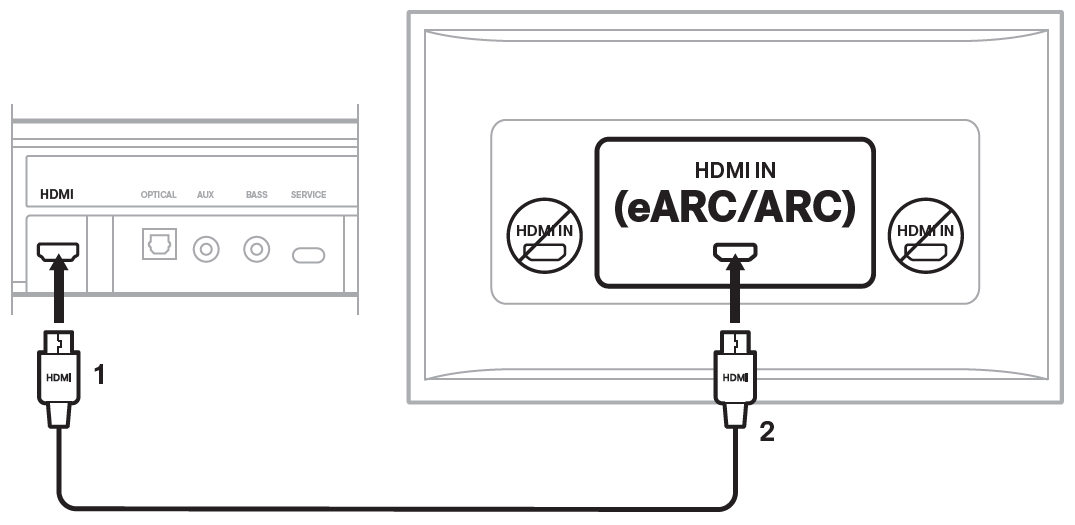
Connect the speaker to the HDMI IN eARC or ARC port on your TV using the HDMI cable.

  1. Connect the HDMI cable to the HDMI port on the back of the speaker.
  2. Connect the other end of the cable to the HDMI IN (eARC/ARC) port on the back of your TV.
    HDMI cable connection from the TV to the TV speaker

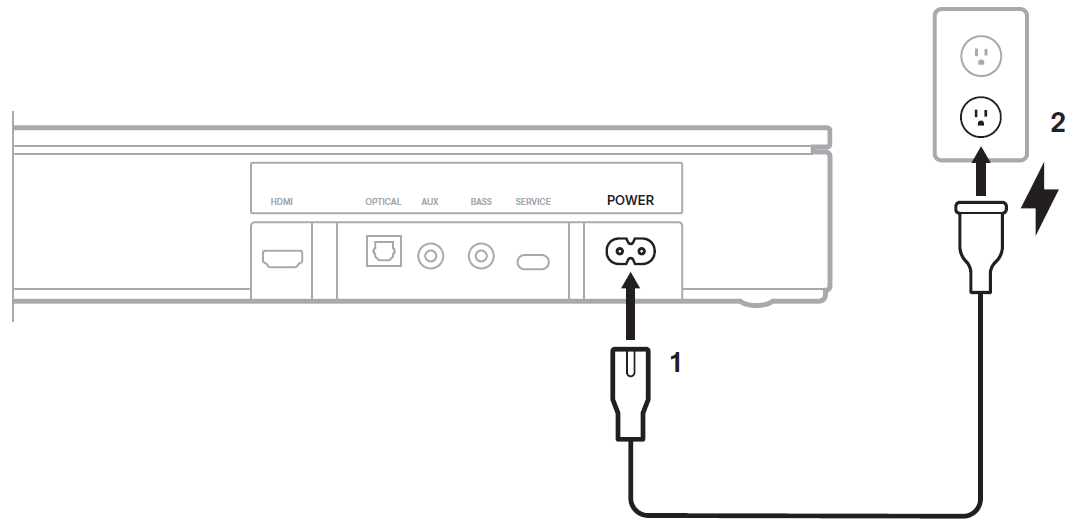
Connect the speaker to power.

  1. Connect the power cord to the Power port on the back of the speaker.
  2. Connect the other end of the power cord to an AC power outlet.
    cable connection to the power port on the back of the TV speaker and an AC outlet
    The speaker will power on and play a tone.

Turn off your TV speakers.

Using the remote control of your TV, access its Settings menu. Navigate the menu and locate the option regarding the TV's speakers. Disable the TV speakers and/or enable the optical output so that sound will only play through the Bose speaker. For more information, refer to the owner's guide of your TV.

Frequently Asked Questions

undefined

undefined

Does the TV Speaker support Bluetooth?

Yes, the Bose TV Speaker can receive Bluetooth audio.

The Bose TV Speaker can receive wireless audio from a source device such as a phone, tablet, or computer that can send audio using Bluetooth functionality. The Bose TV Speaker has Bluetooth version 4.2. For more information, see Connecting a Bluetooth device. We do not recommend connecting the speaker to your TV using Bluetooth functionality.

Can I connect a subwoofer to the TV Speaker?

undefined

Why do I not hear any sound from my TV Speaker?

Check the troubleshooting guide for no sound.

For steps on resolving this issue, see the No audio troubleshooting article for the Bose TV Speaker.
