Understanding LED indicator status lights and information | Bose QuietComfort Earbuds
bose-quietcomfort-earbuds
Bose QuietComfort EarbudsSold from 2024

Understanding LED indicator status lights and information | Bose QuietComfort Earbuds

Earbuds and charging case status lights

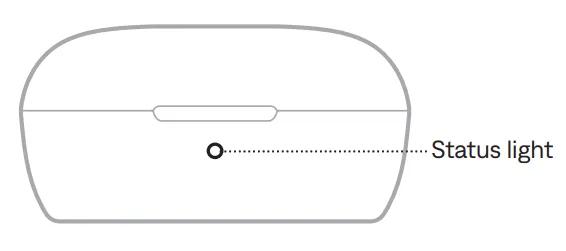
The status light is located on the front of the charging case.
Charging Case LED

Battery Status

Charging case (no earbuds) - Shows the charging case battery status when the case isn’t connected to power and the earbuds aren’t in the case.
  • Solid Green (5 seconds) - High charge (81% - 100%)
  • Solid Amber (5 seconds) - Medium charge (30% - 80%)
  • Solid Red (5 seconds) - Low charge (1% - 29%)
Earbuds - Shows the earbud battery status when the charging case isn’t connected to power and the earbuds are in the case.
  • Solid Green (5 seconds) - Fully charged
  • Slowly Pulses Amber (5 seconds) - Charging

Charging Status

Charging case (no earbuds) - Shows the charging case charging status when the case is connected to power (by USB cable or wireless charger) and the earbuds aren’t in the case.
  • Solid Green - Fully charged
  • Slowly Pulses Amber - Charging
Earbuds - Shows the earbuds charging status when the earbuds are in the case and the case is connected to power (by USB cable or wireless charger).
  • Solid Green - Fully charged
  • Slowly Pulses Amber - Charging
    Note: If the earbuds are fully charged, but the case is still charging, the LED will still slowly pulse amber. Disconnect the case from power to check the earbuds charge level.