Was this helpful?
Voice Commands Do Not Work | Bose QuietComfort Earbuds
Download and Open the Bose QC Earbuds App
The Bose QC Earbuds app is required to use certain features like voice controls. Open the app and have it running in the background. If you are wearing the earbuds and they are connected to your device, you should hear "Voice Controls On" when the app opens.
You can also toggle voice control capability in the Bose QC Earbuds app:
Open the Bose QC Earbuds App
- Select the Voice Controls tile
- Toggle the "Enable Voice Control" switch on or off
How to reboot the QuietComfort Earbuds
- Insert the earbuds into your ears
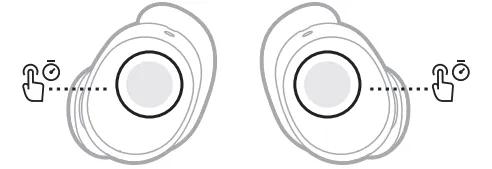
- Touch and hold each earbud for 15 seconds until you hear a tone.
The earbuds power off.
NOTE: Each earbud must be powered off individually. - Hold each earbud for 1 second to power them on. Each earbud must be powered on individually.
